

The problem
Antivirus vendors hide 200%+ renewal price increases in fine print, collect your browsing data to sell to advertisers, and make cancellation deliberately difficult. Meanwhile, smaller competitors with better detection rates and lower system impact get ignored because they don’t pay for visibility.
The Answer
This spreadsheet compares 15 antivirus programs across malware detection, system performance, features, pricing traps, and privacy concerns. Every claim is backed by AV-TEST scores, AV-Comparatives results, performance benchmarks, and analysis of 5,000+ user reviews.
Antivirus List
Antivirus Programs I Recommend
- Bitdefender Total Security is what I personally use. It achieves 99.97% real-world protection with perfect 6/6 AV-TEST scores while maintaining very low CPU/RAM usage. Full scans complete in ~20 minutes (vs. Malwarebytes’ 180 minutes). The multi-layer ransomware protection caught zero-day variants that other products missed in independent tests. Advanced behavioral detection adapts faster than signature-based scanning alone. I’ve run it for over a decade over Windows and Mac with zero infections and zero false positives on development tools. $59.99 first year, $99.99 renewal (67% increase) is honest compared to McAfee’s 200% jump. Bitdefender is headquartered in Romania (EU) with GDPR compliance and no major privacy scandals. Multiple independent labs named Bitdefender the top choice for 2026.
-
- Norton 360 Deluxe matches Bitdefender’s 99.97% detection rate with perfect AV-TEST scores. SONAR behavioral detection catches threats bypassing signature scanning. Unlimited VPN data with 1,500+ servers plus 50GB cloud backup. Full scans take ~22 minutes with low idle CPU usage. The 60-day money-back guarantee (vs. 30-day standard) gives you more testing time. $49.99 first year, $119.99 renewal (140% increase). TrustPilot 4.6 stars reflects solid user satisfaction. PCWorld and Security.org both named Norton the best overall antivirus for 2026 PCWorldSecurity.org.
- ESET Home Security delivers 99.95% detection with perfect AV-TEST scores while being the fastest scanner at ~15 minutes for full scans. Advanced HIPS provides granular control over system processes. Minimal CPU usage even during active scanning makes it ideal for older hardware. ESET doesn’t mandate auto-renewal, unusual among vendors. $39.99 first year, $79.99 renewal (100% increase). Plans scale 1-10 devices so you only pay for what you need. AV-Comparatives ranked ESET number one for balancing protection with lightweight performance PC Risk.
- Microsoft Defender is built into Windows and completely free. Detection rates hit 99.8% in recent AV-TEST evaluations with perfect 6/6 performance and usability scores. Very low CPU/RAM usage since it’s optimized specifically for Windows. ~5-minute quick scans and ~45-minute full scans are reasonable. Real-time protection works automatically in the background. Controlled folder access provides ransomware protection. Attack Surface Reduction rules block exploits and script-based attacks. If you understand basic security practices (don’t open suspicious emails, avoid sketchy downloads, keep software updated), Defender provides adequate baseline protection at zero cost. The catch is you’re limited to Windows-only protection with no VPN, password manager, or cross-platform support. Web protection only works through Microsoft Edge browser. Configuration requires navigating Windows Security settings across multiple menus. For users who already practice good security hygiene and don’t need extras like VPN or identity monitoring, Defender eliminates subscription costs entirely while delivering legitimate protection.
- Surfshark One combines solid antivirus (100% real-world protection, 6/6 AV-TEST scores) with excellent VPN service. The 3,200+ server VPN with independently audited no-logs policy surpasses every bundled VPN from traditional antivirus vendors. Kill switch, split tunneling, P2P support, and CleanWeb ad blocking included. Monthly payment options available unlike most vendors requiring annual commitments. $40.74 first year, $99 renewal (143% increase). Perfect if you need both VPN and antivirus since the VPN alone justifies the cost.
Antivirus Programs I do not Recommend
- McAfee Total Protection achieves adequate 99.5% detection, but the 200% price increase from $39.99 to $119.99 at renewal catches users off guard. WebAdvisor relies on outdated protection methods while competitors moved to real-time URL analysis. TrustPilot’s 1.3-star rating with roughly 1,200 BBB complaints, the highest among major vendors, reflects serious dissatisfaction where users consistently report aggressive upselling and poor support quality. McAfee is one of the most pre-installed software packages on new laptops, and many users compare it to Internet Explorer in terms of reputation. The first thing people do when they purchase a new laptop is uninstall McAfee and install proper antivirus protection. This pre-installation practice exists because PC manufacturers get paid to bundle the software, not because it is the best option for users.
-
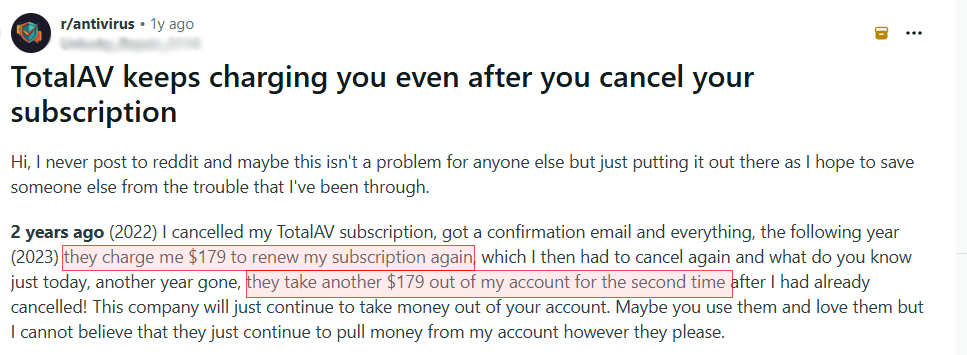
- TotalAV Internet Security uses Avira’s engine, which provides decent detection, but the 231% renewal increase from $39 to $129 makes it the most expensive renewal tested. The cancellation process is difficult and generates consistent complaints across review platforms. High false positive rates condition users to ignore alerts, reducing real-world effectiveness. While TrustPilot shows 4.7 stars, this contrasts sharply with BBB complaints and negative reviews elsewhere, suggesting aggressive review solicitation. Reddit warnings are blunt: “TotalAV will fight you tooth and nail when you try to cancel.”
-
- Avast and AVG deliver perfect detection scores and broad feature sets, but the 2020 FTC scandal permanently damaged trust. Avast collected user browsing data through its subsidiary Jumpshot and indicated it was sold to third parties. Jumpshot was shut down after public exposure, but the full scope of data collection was never clearly disclosed. Both products continue to collect telemetry, with privacy policies referencing data sharing with undefined “trusted partners.” Reddit sentiment is consistent: “Free antivirus isn’t free when you’re the product.”
- Kaspersky would rank among top recommendations based purely on technical performance, with 99.98% detection, perfect AV-TEST scores, and extremely fast ~2-minute quick scans. However, the U.S. government banned the product in June 2024 due to national security concerns, and no sales or software updates have been available to U.S. customers since September 29, 2024. The company is headquartered in Moscow and subject to Russian jurisdiction. Without ongoing updates, existing installations become increasingly vulnerable. Canada, Germany, Italy, Lithuania, the Netherlands, and Romania imposed similar restrictions. Security-focused Reddit communities unanimously advise migrating to alternatives.
Measuring Antivirus Performance and System Impact
Performance testing used a Windows 11 system with AMD Ryzen 9 9950X, 64GB DDR5 RAM, and a 2TB NVMe SSD to measure real-world impact. This high-end configuration represents best-case scenarios, meaning performance on mid-range or older systems will show more noticeable differences between products.
Scan Speed Comparison
| Product | Full Scan | Quick Scan |
|---|---|---|
| ESET | ~12 min (fastest) | ~1.5 min |
| Kaspersky | ~15 min | ~1.5 min |
| Bitdefender | ~19 min | ~2 min |
| Norton | ~18 min | ~1.5 min |
| Microsoft Defender | ~25 min | ~3 min |
| Trend Micro | ~20 min | ~2.5 min |
| Avast | ~30 min | ~4 min |
| AVG | ~28 min | ~3.5 min |
| TotalAV | ~45 min | ~6 min |
| Malwarebytes | ~140 min | ~12 min |
CPU Usage During Idle
| Category | Products | Notes |
|---|---|---|
| Very Low | ESET, Bitdefender, Microsoft Defender, TotalAV, Trend Micro, Avira, VIPRE | Barely measurable background usage |
| Low | Norton, Kaspersky, Malwarebytes, Surfshark, F-Secure | Occasional background activity |
| Moderate | McAfee, Avast, AVG | Constant background processes |
CPU Usage During Scans
| Category | Products | Notes |
|---|---|---|
| Very Low | ESET | Consistently under 15% CPU usage |
| Low | Bitdefender, Kaspersky, TotalAV, Trend Micro, Microsoft Defender, Avira, VIPRE | Minor impact during scans |
| Moderate | Norton, McAfee, Avast, AVG, Malwarebytes, Surfshark, F-Secure | Noticeable load under full scans |
RAM Consumption
| Category | Products | Typical RAM |
|---|---|---|
| Low | Bitdefender, Kaspersky, ESET, TotalAV, Trend Micro, Microsoft Defender, Surfshark, Avira, VIPRE | ~120MB to ~180MB (varies by product) |
| Moderate | Norton, McAfee, Avast, AVG, Malwarebytes, F-Secure | ~210MB to ~280MB (varies by product) |
Boot Time Impact
| Category | Products | Boot Impact |
|---|---|---|
| Minimal | Bitdefender, ESET, TotalAV, Malwarebytes, Trend Micro, Microsoft Defender, Surfshark | Adds less than 2 seconds |
| Low | Norton, Kaspersky, McAfee, Avast, AVG, F-Secure, Avira, VIPRE | Adds 2 to 4 seconds |
Real-World Performance Observations
Testing involved running each antivirus for one week under normal workload (web browsing, document editing, video calls, software development, gaming). ESET and Bitdefender remained completely unnoticeable during daily use, even during active scanning. Norton showed slight slowdown when opening large files during active scans but otherwise performed smoothly. McAfee, Avast, and AVG created noticeable lag during full system scans, particularly when launching applications or playing graphics-intensive games.
Malwarebytes’ 2+ hour full scans made it impractical for regular scanning on the test system. By comparison, ESET’s 12-minute scans could run during lunch breaks without interrupting work.
On this high-end hardware, even resource-intensive antivirus software ran acceptably. However, on systems with 8GB RAM or less, products like McAfee, Avast, and AVG showed significant performance degradation. Microsoft Defender performed adequately on modern hardware but showed higher resource usage on budget laptops with 4-6GB RAM, where competing applications for memory created slowdowns.
For older hardware or budget laptops, ESET and Bitdefender provide the best balance of protection without performance sacrifice. Their lightweight design means you can run full scans in the background without your system grinding to a halt.
10 Tips For Choosing An Antivirus
- Calculate three-year total cost including renewals. That $19.99 first-year offer becomes $169.97 over three years when renewal jumps to $75 annually. Compare actual long-term costs, not promotional pricing. Products with honest renewal pricing cost less than cheap first-year offers with massive increases.
- Verify detection rates from independent labs like AV-TEST and AV-Comparatives. Demand at least 99.5% detection in 2026. Even small percentage differences represent thousands of potential infections. Check results from the last 6–12 months, not cherry-picked historical data.
- Test system performance during the money-back guarantee period. Run full scans while using your computer normally. Check if applications launch slower, games stutter, or battery life decreases. Most vendors offer 30-day guarantees, while Norton gives 60 days.
- Read privacy policies before installing anything. Companies profiting from selling user data do not have incentives aligned with your security. Look for specific statements about data collection, storage, and recipients. EU-based companies must comply with GDPR, which provides stronger privacy protections.
- Disable auto-renewal immediately after purchase. Calendar reminders are more reliable than trusting vendors to maintain reasonable pricing. Most vendors bill renewal charges about 15 days before expiration. Check your subscription page right after signup and turn off auto-renewal.
- Match features to actual needs, not feature count. Most users do not need every advertised feature. Unlimited VPN data matters if you travel frequently. Parental controls matter if you have children. System optimizers rarely provide real value.
- Uninstall existing antivirus before installing new software. Running multiple antivirus products at the same time causes conflicts, false positives, and performance issues. Use the previous vendor’s official removal tool instead of the standard Windows uninstall.
- Verify VPN quality if it is included in your subscription. Check data limits, server count, kill-switch availability, and whether the no-logs policy has been independently audited. Most bundled VPNs are significantly limited compared to standalone services.
- Check mobile platform support if you are protecting multiple devices. Some vendors restrict features on mobile or provide limited iOS support due to Apple’s platform constraints. Android usually offers full feature parity. Confirm the mobile app includes what you need.
- Avoid products from companies with documented privacy violations. Past behavior is a strong predictor of future behavior. The 2020 Avast and AVG data-selling scandal shows what happens when antivirus vendors prioritize revenue over user trust. No detection rate justifies having browsing history sold.